Showing posts with label internet. Show all posts

BSNL 3G GPRS Using 2G Pack April 2013 Tips

After many research i have get this BSNL 3G Tips. Please Keep it secret, otherwise it will be blocked soon. I have tested with 3 SIM in KOLKATA circle. But I think this trick will work all over India.
  So here is the tricks:-
BSNL 3G GPRS TIPS USING 2G PACK


  • First recharge with any 2G packs, you will get 2G speed.
  • Use it on that day with 2G speed.
  • Next day recharge with Rs.25.00 3G pack (100 mb for 3 days).
  • You will get 3G speed for the period of your 2G recharge pack.(not 3 days)
  • If you don't get 3G speed, wait for 8Hours, you will surely get 3G speed.
  • Please leave your comments after using the trick.

Developing | Designing Tricks for Web Sites Web Blogs


Basic Tricks for Web Site | Web Blog Developing | Designing

While designing a website or web–blog we should know some basic tricks for web development and web designing. Quality website must have capacity to attain high page ranking, better SEO and appearance in various SERPs. Here, in this article, we have listed some simple tips and ticks following which one can easily develop quality website and get listed quickly by various search engines like Google, Yahoo, Bing, MSN etc. As people all around the world want to make a good website or blog but they don’t know how to make better web designing as well as better web development. We highly recommend people going to develop a website or creating blogging site should learn basics of HTML (Hyper Text Markup Language), CSS (Cascading Style Sheet) and Javascript before they proceed to do to. Our advice for best website developing is actually based upon basics of HTML, CSS and CSS. So let us start with these simple but powerful advices on web development. We suggest our followers to understand and use these simple web developing tricks. At present we are listing the best 50 tricks to develop | design high quality website | web–blog.

50 Simple Tips & Tricks for
Website | Blog Designing | Development

  • Your page must follow HTML, CSS and JS standards and recommendations.
  • Keep your HTML easily readable and well organized.
  • Hexadecimal color system should be used when describing a color, avoid using system color names.
  • Make sure all page titles are unique and relevant to content of the page.
  • ALT (alternate text) property on all images should be used.
  • Do test your webpage | site in several web browsers and also with different operating systems.
  • Testing, testing, testing and testing! Finally test again and once more for good evaluation.
  • Page design should be kept simple and easy to use.
  • Relevant keywords and descriptions for each page should be used for better SERP.
  • Page content should be fresh and up to date.
  • Verify spelling and grammar errors on your site and correct those mistakes as needed.
  • Broken links on your website should be checked at regular intervals and should be fixed as needed.
  • Don’t overuse of flashy or moving elements.
  • Target screen size and color depth should be defined clearly.
  • Targeting browsers should be defined and tested again and again against each.
  • Try every possibility to avoid using frames in your site.
  • Avoid placing any email addresses on any page
  • Way for visitors to contact the site owner must be provided.
  • Don’t create pages which take longer time to download (render).
  • Optimize images first to look fine and try to keep image file size smallest possible.
  • Use CSS (Cascading Style Sheets) and DIVs (DIV elements) for site layouts rather than using tables.
  • Avoid making a page flooded with big-big ads
  • Transparency as to where links will take a user should be maintained.
  • Use a style-sheet to summarize CSS code whenever possible
  • Copyright, privacy and terms of use policies should be stated clearly wherever needed.
  • Do not put automatic sound or video, ever!
  • Using Flash for navigation or the entire site layout should be avoided.
  • Coding conventions to use prior to starting development should be clearly defined.
  • SSL (Secure Sockets Layer) is used for all private and confidential information transfers. Ensure it.
  • When planning design and content for your site, audience view must be kept in mind.
  • To make texts on your website easily readable provide enough contrast for text.
  • Try to stay legal whenever possible. It is usually helpful for your website.
  • Consistent Headings and Sidebars should be used.
  • Solutions to major technical difficulties should be cleared early in the lifecycle of development.
  • For others keep it easy to bookmark to the site or a page.
  • Add JS (JavaScript) code to the file which should be included only where needed.
  • Consistency in the code should be made to make it easier to maintain.
  • Make your site navigation obvious.
  • While developing your site page develop it with maintenance in mind (i.e. be cool).
  • Keep a record of everything possible and must record unique solutions to problems
  • Avoid changing page URLs after they are indexed by search engines. If changing of page URL is necessary then provide a redirect if required.
  • You should make plan before making each and every change to a site. Also see the path to the end result after making changes to your website.
  • Try making RSS Subscription links obvious.
  • Over inline styling CSS (Cascading Style Sheet) style-sheet INCLUDE should be used.
  • Also provide alternative subscription methods, like by email or by sms
  • Don’t do copyright violation and where necessary give attribution too.
  • For all file assets establish and test thoroughly a backup and recovery plan.
  • A clean and well organized file system for web asset files must be maintained.
  • Monitoring to catch and help should be established in reducing system interruption or failure.
  • DOCTYPE declaration on all pages must be used.
  • We hope in the near future we would be adding some more tips for web | blog design and development our readers | followers. Your doubts | thoughts on tips for developing high rank websites | blogs shall be heartedly welcomed by our blog administrators. 
    Hence without any hesitation you are free to write below your reviews | thoughts etc on web design | development tips & tricks. 

You can Travel in Train without IRCTC e-Ticket PrintOut


Travel with IRCTC Electronic e-Ticket instead of IRCTC e-Ticket Print Out

Good news for rail passengers, IRCTC along with Indian Railways has taken much needed step for its customers. Now, rail passengers can travel in trains without carrying printouts of e-tickets booked online through IRCTC. Earlier, passengers traveling without IRCTC e-ticket printout were to pay a fine of Rs 50 per ticket. So after booking tickets online through IRCTC, rail passengers were forced to take a printout of e-ticket on a A4 size page to avoid such unwanted fine by the ticket examiners in the train while traveling.

What to do to Travel Without E-Ticket Printout

Well, you also dont want to take printout of e-Ticket. For this you can travel with just a soft copy of IRCTC e-ticket. The soft copy can be:
  • SMS by IRCTC | Railways- The ticket confirmation SMS sent by IRCTC | Railways after you complete the online ticket booking process will also serve as E Ticket. You can travel by showing that SMS message of the e-ticket on your mobile phone. But ensure it that the SMS contains all the vital details of the rail-ticket like PNR, Date of Journey, Train Number, class, name & number of rail passengers, coach number & Seat Number and amount of fare paid. One illustrated example of the SMS is
    PNR: 4231009529 Train: 16723, DOJ: 15/07/2011, 3AC, NDLS to BCT, Hari Krishna +3, S1 10-13, Fare Rs 10,000, SC Rs 10 (+PG charges as applicable)
  • Electronic Reservation Slip (ERS)- The printout in standard specified Performa containing reservation particulars, and instructions for use which can be used by the passenger along with the relevant authorized Identification, as travel authority for performing the journey.
  • Virtual Reservation Message (VRM)- A screen-shot of the e-ticket displayed through laptops/palmtops/ Mobile phone is referred as Virtual Reservation Message (VRM).
  • Mobile Reservation Message (MRM)- A screen-shot of the e-ticket on mobile phones for tickets booked through mobile phones.
SMS | ERS | VRM | MRM sent by IRCTC | Railways along with one of the nine prescribed proofs of identity in original will also authorize the passenger to enter the platform on the day of journey and he/she will not be required to purchase platform ticket. SMS | ERS | VRM | MRM sent by IRCTC | Railways along with original id proof will be required also to be produced on demand of Ticket Checking Staff on the platform.
50 Lakh A4 size papers could be saved every year by taking this revolutionary step as said by Indian Railways. Really this is a environment-friendly and bold step towards a greener world. So people should now stop taking print-outs of the e-Tickets for making journey in trains.
By now, you have clearly known it that “E - Ticket Print Out is Not Required” while traveling in trains. So, next time when you book any ticket through IRCTC website avoid taking the prints of your ticket instead remember to carry the E-Ticket in the electronic modes on your devices like Mobile, SmartPhone, Laptop, IPad etc.
Please do share your thoughts | reviews or write comments on
IRCTC's “Go Green” initiative of traveling without e-ticket print-out.

Real Time Train Running Information (RTIS) at simran.in


Train Running Information Real Time Rail Enquiry Live at simran.in

Indian Railways is Asia’s largest rail network. About 30 million railway passengers travel daily in 10,000+ trains running across the country. Railway network in India is like a big net spread widely across the country making Indian Railways a complex system. So train running information system in India plays a vital role for Indian railways passengers, general public and worried relatives of the train travelers.  

Necessity of GPS based Train Tracking System

Indian Railways has continuously been improving its services related to train running information to rail users | passengers | travelers. In fact some years ago Railways has already added internet based Enhanced National Train Enquiry System to provide train running information besides its manual (telephonic) train enquiry system. Currently online train running status is viewed widely over the internet using Enhanced National Train Enquiry System for almost all the passenger trains running in India. Two shortcut methods to track train online have already been described in my previous post related to railway live train running status trick to view online train position. Since currently accessible Train Running Information viewed at Indian railway website trainenquiry.com is primarily dependent on manual feeding of train positional data with time, it has certain limitations. So to overcome this situation usage of Advanced Communication and Information Technology such as GPS basedtrain tracking system was felt. 

Launching of Satellite based Train Running Information

To fulfill latest customer expectations, recently, the Real Time Train Information System (RTIS) project was started by Indian Railways on October 19, 2011. This Real Time Train Information System (RTIS) project is actually train enquiry system based on GPS which provides accurate train running information to rail passengers | general public. Through this new online train running position, rail passengers can also know about current speed of running train, next stoppage station with remaining distance in km, nearest approaching or recently passed intermediate railway station and much more. Through Real Time Train Information System passengers | travelers | public can easily know current train position, train running location i.e. if train is running right time (RT) or if train is running late (LT) too. 

What actually is Real Time Train Information System

Real Time Train Information System (RTIS) project is based on SIMRAN and has jointly been developed by Indian Railways and IIT Kanpur. SIMRAN stands forSatellite IMaging for RAil Navigation. As RTIS is based on satellite, so accurate tracking of running train is easily possible for rail travelers. Real Time Train Information System is able to provide accurate train running information on a single click of mouse button on your computer or laptop or through a SMS sent from your mobile. Seeing this advanced features, RTIS will be welcomed by rail passengers as it was an important demand for a long lime. This new running train position system will replace the currently train running information system. Introduction of SIMRAN in Indian Railways is a revolutionary step which would bring a big turnaround in representing correct online live information on train timetable of running trains. 

Where do you find Real Time Train Running Information

SIMRAN.IN is the website through which newly launched Real Time Train Running Information can be accessed to get live train running status of desired train. Now first phase of Real Train Information System (RTIS) for general public is available on Pilot Basis to access at the website http://simran.in. In first phase of RTIS one can track real time live position of only few important trains which are train number 12003 | 12304 Lucknow - New Delhi Shatabdi Express, train number 12301 | 12302 Howrah - New Delhi Rajdhani Express (via Gaya Junction), train number 12305 | 12306 Howrah - New Delhi Rajdhani Express (via Patna Junction), train number 12313 | 12314 Sealdah - New Delhi Rajdhani Express, train number 12951 | 12952 Mumbai Central - New Delhi Rajdhani Express and train number 12953 | 12954 Mumbai Central – Nizamuddin A K Rajdhani Express. To access live real time train position data of above trains SMS service is also available on 09415139139. You can SMSTrain Number only to get the latest position of desired train. Alternatively, you can access train status on your internet enabled mobile phone or in your laptop | PC at the website simran.in. 

How to get Real Time Train Running Information (RTIS) at simran.in

One can easily get Real Time Train Running Information (RTIS) using one of the methods given below:
  1. Live Train Running Information on your Computer | Laptop | Smart-Phone:

    • Just type in the address bar of your internet browser: simran.inand press enter.
    • Here you will get a webpage displaying a list of running trains along with their online live status.
    • SIMRAN.IN HomePage
    • Click on the Train Number you want to look further.
    • Finally you have detailed station by station updated time table of the train as shown below.
    • Running Train Status of 12301 at SIMRAN.IN
  2. Train Running Position through SMS:

    • For current train position through SMS simply send a text message "<train number>" to mobile number 09415139139.
    • For example a passenger seeking current train position of train number 12004 would simply send 12004 to mobile number09415139139.
    • One actual SMS reply received from 09415139139 is:
      On 19/10/2011 10:00, Train 12004 N Delhi – Lucknow Shat. is running at 129 kmph near Bharthana, 126 km from KANPUR CENTRAL. Presently Right on time
    • Ministry of Railways has approved to implement RTIS for tracking all trains, passenger trains and freight trains too. The complete RTIS project is scheduled to be completed by December 2012. Hopefully we will enjoy this new real time train running information system in the year 2013, until that time we can get running position of only selected trains at the website simran.in.
      So enjoy accessing real time train running status online
      and
      Feel free to share your Reviews | Write Your Comments Here: 

Increase Internet Speed | Bandwidth 20% Trick Windows XP


Internet Bandwidth | Connection Speed 20% Increase in Windows XP

Bandwidth, in terms of computer networking, is the measure of data transfer speed. Accessing Internet with high speed has always been first choice of every net users. But due to lack of infrastructure available in most of places, only limited internet speed | bandwidth is available to most of the internet | broadband users.

Where do you get the Hidden Internet Bandwidth

In Windows XP there is some amount of internet bandwidth reserved | hidden itself by Windows. So today I am telling you that hidden trick | tweak available in Windows XP (SP2 & above) to increase your internet speed | bandwidth by 20%. Actually, this 20% of Internet Bandwidth is reserved by Windows to perform Windows Update & such other tasks. Since, Windows is not always required to be updated, you can enjoy this reserve Internet Bandwidth for your System for faster internet.

How to Increase Your Broadband | GPRS Internet | Bandwidth Speed in Windows XP SP2

Easy steps involved for increasing internet | broadband speed are listed below. The first list contains only steps in short but in the second list you will find steps to boost your internet speed along with screenshots.

Steps to Boost Internet | Broadband | GPRS Speed

  1. Click on Start Button   >>>  Run  >>>  Type in there "GPEDIT.MSC"  [do not include quote(" ") there] >>> HIT "ENTER" Key.
  2. Doing this opens a Window Titled "Group Policy".
  3. This Window contains a Tree View like structure in theLeft Pane.
  4. On that Tree Structure Click on: Local Computer Policy >>>  Computer Configuration  >>> Administrative Template  >>>  Network  >>> QOS Packet Scheduler.
  5. You can now see "Limit Reservable Bandwidth" appeared in the Right Pane of the Window.
  6. Now, Double Click on the "Limit Reservable Bandwidth", this will Open a Pop-Up window (which may say it that "Limit Reservable Bandwidth" is not configured but do not worry and proceed).
  7. Now, Click on Enabled and type 0 [i.e. fill in ZERO] in theBandwidth limit (%) Box.
  8. Finally, Click on Apply  >>>  OK.
  9. Done, you can now easily observe it that your internet speed is increased by 20%.

Easy Steps with Snapshots on How to Increase GPRS | Broadband | Internet Speed in Windows XP

  1. Click on Start Button   >>>  Run  >>>  Type in there "GPEDIT.MSC"  [do not include quote(" ") there] >>> HIT "ENTER" Key.
    First Step to Increase Internet | Broadband Speed
    Increase Internet Speed : Step 1 (a)

    First Step to Increase Internet | Broadband Speed
    Increase Internet Speed : Step 1 (b)

  2. Doing this opens a Window Titled "Group Policy".
    Second Step to Increase Internet | Broadband Speed
    Increase Internet Speed : Step 2

  3. This Window contains a Tree View like structure in theLeft Pane.
    Third Step to Increase Internet | Broadband Speed
    Increase Internet Speed : Step 3

  4. On that Tree Structure Click on: Local Computer Policy >>>  Computer Configuration  >>> Administrative Template  >>>  Network  >>> QOS Packet Scheduler.
    Fourth Step to Increase Internet | Broadband Speed
    Increase Internet Speed : Step 4

  5. You can now see "Limit Reservable Bandwidth" appeared in the Right Pane of the Window.
    Fifth Step to Increase Internet | Broadband Speed
    Increase Internet Speed : Step 5

  6. Now, Double Click on the "Limit Reservable Bandwidth", this will Open a Pop-Up window (which may say it that "Limit Reservable Bandwidth" is not configured but do not worry and proceed).
    Sixth Step to Increase Internet | Broadband Speed
    Increase Internet Speed : Step 6

  7. Now, Click on Enabled and type 0 [i.e. fill in ZERO] in theBandwidth limit (%) Box.
    Seventh Step to Increase Internet | Broadband Speed
    Increase Internet Speed : Step 7

  8. Finally, Click on Apply  >>>  OK.
    Eighth Step to Increase Internet | Broadband Speed
    Increase Internet Speed : Step 8

  9. Done, you can now easily observe it that your internet speed is increased by 20%. Loved this article for making your internet speed broadband | GPRS bandwidth. So enjoy surfing web with increased internet speed on your PC | Laptop. Do share your views | thoughts on increasing your internet | broadband speed.

IRCTC Steps made Tatkal Ticket Booking Trouble-Free


IRCTC implemented Steps to Streamline Tatkal Ticket Booking for Rail Passengers

Tatkal ticket scheme is to meet urgent travel requirements of rail passengers who plan their journey at short notice. Tatkal ticket scheme was introduced for convenience of train travelers. But recent reports reveals it that the Tatkal scheme is being misused by a certain section of the public. So to stop misuse of Tatkal scheme urgent steps were felt necessary.Indian Railways Catering and Tourism Corporation (IRCTC), a PSU of Ministry of Railways which manages Railways e-ticketing website namely www.irctc.co.in has implemented additional steps to streamline Tatkal ticket bookings. These steps taken by IRCTC will ensure delivery of Tatkal train tickets to the needy travelers likely to travel on urgent need.


Steps taken by IRCTC to streamline tatkal ticket booking

tatkal ticket booking common problemsOnline Tatkal Booking : Common Problems
Following steps have been implemented by IRCTC, the online ticket booking website, to make trouble-free Tatkal tickets booking for rail travelers:
  • High capacity Database servers have been installed.
  • Internet Bandwidth has been increased from 344 mbps to 450 mbps
  • Single user registration on one e-mail ID with email verification has been implemented.
  • Mobile validation of users and single user registration on one mobile number has been implemented.
  • Web service agents have been permitted to book only one Tatkal ticket per train per day on internet after 12:00 hours
  • Individual users are permitted to book only two tickets between 10:00 hours to 12:00 hours
  • Only two tickets can be booked per IP address between 10-12 AM. IP address check has helped in preventing multiple bookings from same office complex / internet cafe etc. This also helps in facilitating bookings by genuine users and prevents bookings for commercial gains.
  • Single session per user ID check has been implemented. With this step, a user on irctc.co.in will be able to open his account for booking of e-tickets only once. Multiple sessions with single user ID cannot be opened thereby enabling maximum users to access website and reduce congestion.
  • Captcha has been put and strengthened for booking in the ‘Plan My Travel’ to check fraudulent booking through automation software. (CAPTCHAs is a technology used in attempts to prevent automated software from performing actions which degrade the quality of service of a given system)
  • Quick Book Option and Cash Cards option has been stopped between 10:00 hours to 12:00 hours
  • An IT-Anti Fraud Squad has been created at Internet Ticketing Centre to detect cases of fraud and fraudulent activity and also for constant cyberspace surveillance to detect possible threats to the system.
  • Upon receipt of complaint against the sub-agent, the user–id is deactivated and the sub-agent is black-listed. The details of the black-listed agent are put on the IRCTC website. All the Principal Agents have been instructed not to take on such black-listed agents.
  • For any complaint, against the e-ticket agents, one may contactagentcomplaint@irctc.co.in (011-23745962) or care@irctc.co.in (011-39340000)
  • The Ministry of Railways has also initiated steps to augment e-ticket handling capacity of its website through short term and long term measures. Both IRCTC and CRIS are working jointly in this direction. Due to these steps, the present e-ticket capacity will increase from existing about 3.5 lakh bookings to around 5 lakh bookings per day in about four months period in the short term which will further be increased to about 8 lakh bookings per day in the long term plan.
Implementing the above steps by IRCTC it is assumed that rail passengers can avail problem-free Tatkal ticket booking.
So you must be aware of these new rules while you book Tatkal rail ticket and do share your comments, views, suggestions on accessing IRCTC initiatives for making tatkal booking easier for passengers.

Google Chrome Offline Installer Latest Version Download


Google Chrome Latest Version Offline Installer Free Download Chrome

Looking for latest version Google Chrome offline installer free download? No matter when you are browsing this page, you will always find here latest version Google Chrome offline installer direct download link for free. This page updates download links for Google Chrome offline download whenever new version of Google Chrome releases so that you can enjoy latest Google Chrome browser features.

Why Google Chrome is the most popular web browser

Google Chrome is the fastest and most popular web browser of the planet. Currently, most people across the world use Google Chrome browser due to its lightening fast speed, simplicity, security, usability and other useful features. Google Chrome is free web browser taking seconds to install on all popular versions of windows such as Windows XP, Windows Vista, Windows 7, etc. People love to install Google Chrome on their computers and laptops. Google Chrome has become so popular that these days web users started to switch their old web browser to this lightening fast Google Chrome web browser.

What is Google Chrome Offline Installer

google chrome offline installer free download
Google Chrome offline installer is the installer setup to install Google Chrome web browser in any computer or laptop without being online during installation process. Internet connection isn’t required for installing Google Chrome web browser from offline installer.

Why Google Chrome Offline Installer is needed

The only annoying thing of downloading Google Chrome is that whenever you download Google Chrome setup from its office website you get a small executable installer file. Now each time you try to install Google Chrome in any computer from the small installer executable file so downloaded, you will be required to be online for downloading other installer files from Google download server to complete the installation process of chrome. This is why people don’t want to download small installer of Google Chrome web browser instead they look for downloading offline installer of Google Chrome web browser.

How to Download Google Chrome Offline Installer

You can easily download Google Chrome offline installer in your PC. Using this offline installer you can any time install Google Chrome web browser in any computer/laptop without being online to complete installation. The easy steps to download Google Chrome Offline Installer are explained here:
  • You can find below the URL (web address) of latest version Google Chrome offline installer.
  • Simply click on the offline installer link of Google Chrome.
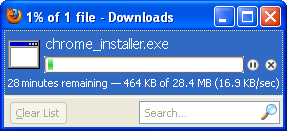
  • google chrome offline installer downloading
  • You will be asked to save the installation file to your disk.
  • Specify the location where you want to save the installer file and click on SAVE or OK button.
  • Once you saved the offline installer of Google Chrome, you can install Google Chrome whenever you need it.(NOTE: If downloading don’t start after clicking on the latest offline installer link of Google Chrome, then right click on “save link as” or “save file as” to download installer file on your computer)
  • You have completed downloading latest version Google Chrome offline installer. Now install Google Chrome on your Computer.
This way offline installer of Google Chrome can be downloaded and saved.

Previous version Google Chrome offline installer download

As some users like to download and install previous version of Google Chrome offline installer. For those, I have listed here last few versions with direct download link for downloading Google Chrome offline installer.
  • Google Chrome 23.0.1243.2 Dev offline download

    Updated on: Aug 24, 2012 File Size: 31.24 MB (32,759,208 bytes)
    http://dl.google.com/chrome/win/23.0.1243.2_chrome_installer.exe
  • Google Chrome 22.0.1229.26 Beta offline download

    Updated on: Aug 30, 2012 File Size: 30.74 MB (32,237,480 bytes)
    http://dl.google.com/chrome/win/22.0.1229.26_chrome_installer.exe
  • Google Chrome 22.0.1229.14 Beta offline download

    Updated on: Aug 24, 2012 File Size: 30.51 MB (31,989,672 bytes)
    http://dl.google.com/chrome/win/22.0.1229.14_chrome_installer.exe
  • Google Chrome 22.0.1229.12 Dev offline download

    Updated on: Aug 22, 2012 File Size: 30.52 MB (32,001,448 bytes)
    http://dl.google.com/chrome/win/22.0.1229.12_chrome_installer.exe
  • Google Chrome 22.0.1229.8 Dev offline download

    Updated on: Aug 17, 2012 File Size: 30.50 MB (31,983,528 bytes)
    http://dl.google.com/chrome/win/22.0.1229.8_chrome_installer.exe
  • Google Chrome 22.0.1229.6 Dev offline download

    Updated on: Aug 16, 2012 File Size: 30.53 MB (32,014,248 bytes)
    http://dl.google.com/chrome/win/22.0.1229.6_chrome_installer.exe
  • Google Chrome 22.0.1229.2 Dev offline download

    Updated on: Aug 10, 2012 File Size: 30.50 MB (31,983,528 bytes)
    http://dl.google.com/chrome/win/22.0.1229.2_chrome_installer.exe
  • Google Chrome 22.0.1229.0 Dev offline download

    Updated on: Aug 08, 2012 File Size: 30.51 MB (31,990,184 bytes)
    http://dl.google.com/chrome/win/22.0.1229.0_chrome_installer.exe
  • Google Chrome 22.0.1221.0 Dev offline download

    Updated on: Jul 31, 2012 File Size: 30.46 MB (31,944,104 bytes)
    http://dl.google.com/chrome/win/22.0.1221.0_chrome_installer.exe
  • Google Chrome 22.0.1215.0 Dev offline download

    Updated on: Jul 24, 2012 File Size: 30.42 MB (31,899,880 bytes)
    http://dl.google.com/chrome/win/22.0.1215.0_chrome_installer.exe
  • Google Chrome 22.0.1207.1 Dev offline download

    Updated on: Jul 17, 2012 File Size: 30.27 MB (31,737,768 bytes)
    http://dl.google.com/chrome/win/22.0.1207.1_chrome_installer.exe
  • Google Chrome 22.0.1201.0 Dev offline download

    Updated on: Jul 10, 2012 File Size: 30.14 MB (31,606,184 bytes)
    http://dl.google.com/chrome/win/22.0.1201.0_chrome_installer.exe
  • Google Chrome 21.0.1180.89 offline download

    Updated on: Aug 31, 2012 File Size: 30.34 MB (31,810,472 bytes)
    http://dl.google.com/chrome/win/21.0.1180.89_chrome_installer.exe
  • Google Chrome 21.0.1180.41 Beta offline download

    Updated on: Jul 13, 2012 File Size: 30.08 MB (31,543,208 bytes)
    http://dl.google.com/chrome/win/21.0.1180.41_chrome_installer.exe
  • Google Chrome 21.0.1180.15 Beta offline download

    Updated on: Jun 29, 2012 File Size: 28.77 MB (30,162,856 bytes)
    http://dl.google.com/chrome/win/21.0.1180.15_chrome_installer.exe
  • Google Chrome 21.0.1180.11 Dev offline download

    Updated on: Jun 26, 2012 File Size: 28.78 MB (30,174,632 bytes)
    http://dl.google.com/chrome/win/21.0.1180.11_chrome_installer.exe
  • Google Chrome 21.0.1180.4 Dev offline download

    Updated on: Jun 22, 2012 File Size: 28.76 MB (30,161,832 bytes)
    http://dl.google.com/chrome/win/21.0.1180.4_chrome_installer.exe
  • Google Chrome 21.0.1180.0 Dev offline download

    Updated on: Jun 20, 2012 File Size: 28.76 MB (30,152,104 bytes)
    http://dl.google.com/chrome/install/1180.0/chrome_installer.exe
  • Google Chrome 21.0.1171.0 Dev offline download

    Updated on: Jun 12, 2012 File Size: 28.61 MB (30,001,576 bytes)
    http://dl.google.com/chrome/install/1171.0/chrome_installer.exe
  • Google Chrome 21.0.1163.0 Dev offline download

    Updated on: Jun 05, 2012 File Size: 28.48 MB (29,867,432 bytes)
    http://dl.google.com/chrome/install/1163.0/chrome_installer.exe
  • Google Chrome 21.0.1155.2 Dev offline download

    Updated on: May 30, 2012 File Size: 28.38 MB (29,757,352 bytes)
    http://dl.google.com/chrome/install/1155.2/chrome_installer.exe
  • Google Chrome 21.0.1145.0 Dev offline download

    Updated on: May 22, 2012 File Size: 29.61 MB (31,046,056 bytes)
    http://dl.google.com/chrome/install/1145.0/chrome_installer.exe
  • Google Chrome 20.0.1132.17 Beta offline download

    Updated on: May 25, 2012 File Size: 27.27 MB (28,597,672 bytes)
    http://dl.google.com/chrome/install/1132.17/chrome_installer.exe
  • Google Chrome 20.0.1132.11 Beta offline download

    Updated on: May 18, 2012 File Size: 27.26 MB (28,597,432 bytes)
    http://dl.google.com/chrome/install/1132.11/chrome_installer.exe
  • Google Chrome 20.0.1132.8 Beta offline download

    Updated on: May 16, 2012 File Size: 29.23 MB (30,646,144 bytes)
    http://dl.google.com/chrome/install/1132.8/chrome_installer.exe
You can choose one of the previous version Google Chrome installer as per your need from above. 

Advice on offline installer of Google Chrome

We advice all our visitors / users to download Google Chrome latest version for accessing their favorite pages instantly with lightning fast speed. Also, Google Chrome browser combines the smallest design with advanced technology for making the web faster, safer, and easier. Tell all your friends to use the latest Google Chrome web browser.
Hence by now you have known how to download latest release of Google Chrome offline installer for free. Remember, we update latest offline download link of Google Chrome as and when new version is released. In case you face any problem in downloading or installing Google Chrome, you are fully released to share your comments | reviews | thoughts | suggestions on latest version of Google Chrome offline installer free download.

Releated search for Google Chrome offline installer

People visited this page also searching for Google Chrome offline, Google Chrome full installer, Chrome offline installer download, Google Chrome full setup download, download Google Chrome offline, Chrome standalone installer, Google Chrome offline installer, Chrome offline version installer, Chrome offline, Chrome standalone, standalone Google Chrome latest version, chrome installer exe, etc. 

Google Chrome 23.0 Offline Installer

Latest version Google Chrome Offline Installer

Updated on: Aug 28, 2012   File Size: 31.49 MB, i.e. 33,015,720 bytes
Google Chrome 23.0.1246.0 Dev offline installer link
http://dl.google.com/chrome/win/23.0.1246.0_chrome_installer.exe
Related Posts Plugin for WordPress, Blogger...

Share

Floating Social Media Buttons for Blogger by Beautiful Blogger Widgets

Share
Get This
Hindi Shayari